In the past month we’ve had weekly high severity security vulnerabilities, notably in PHP, Synology, MCTCP.
I don’t think we’re going to catch a break with AI that tirelessly pores over every nook and cranny of the world’s source code. With each device being a potential trojan horse on your home network, one thing that brings me peace is how the network is segmented and isolated.
Network segmentation
The router sets up VLANs which compartmentalize the network into:
- Trusted VLAN: Unrestricted WAN internet access and full routing access to all other VLANs.
- This is the default everyone gets with their ISP router.
- Untrusted VLAN: Outbound WAN internet access only; blocked from accessing other VLANs.
- All IOT gadgets go here.
- Restricted VLAN: No access to internet or any other part of network.
- Primarily for the TV, which only receives HDMI signal and does not need any connectivity.
- Also good candidate for cameras, so that their feed stays local. Get an ONVIF camera.
Networking infrastructure
This is possible thanks to a few devices at the trunk of the network that have capability to work with tagged packets.
Router: Defines VLANs and firewall
- Defines VLANs
- Firewall constrains traffic from and across VLANs
- DHCP, DNS
- Proxy
- Avahi and other workarounds against complexity of segmentation
Access Point
- Broadcasts SSIDs corresponding to all VLANs
- Sets VLAN tags based on SSID.
Managed switch:
- Sets VLAN tags based on physical port or MAC address
Simple diagram
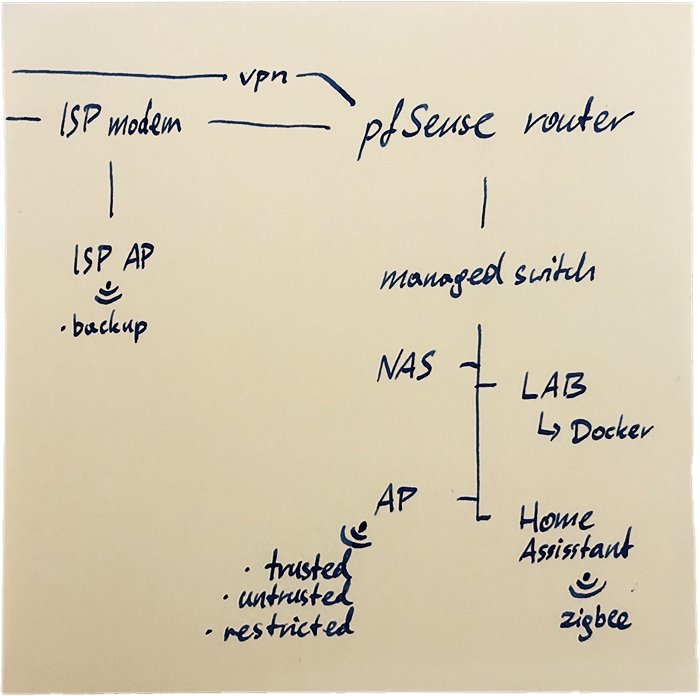
In addition to the Router, Access Point (AP) and managed switch, this diagram shows:
- Network Attached Storage
- Home Assistant and its Zigbee network of local IOT devices that don’t require cloud connectivity
- Home Lab that runs various services in Docker
- the ISP modem (WAN) and its Access Point which broadcasts backup SSID in case of a hypothetical issue with my network
Caveats
You can find full solutions online, so I’ll just list special stuff I had to do.
- Network discovery does not work across VLANs.
- To work around it, use Avahi on the router. It’s a mDNS reflector and allows devices to discover over the network
- Set firewall to allow mDNS and device-specific traffic out of the untrusted VLAN.
- Printer discovery did not work.
- The printer needs to just work, so it’s promoted to trusted VLAN so that personal devices can use it and all its features.
- Get a trusted, reliable workhorse, like Brother, so that this convenience does not feel like a compromise in security.
- Use proxy server to give docker services a friendly name.
- After a few docker containers running on the home lab, I could no longer remember the port numbers.
- DNS Resolver maps human-readable name to IP address of the docker host
- HAProxy maps human-readable name to IP address and a port
- Use custom DNS server!
- Your ISP has less data on you to sell to advertisers.
- ISP dns is so slow
- Can configure DNS over TLS or HTTPS
- Some options to consider
- Quad9:
9.9.9.9- security, privacy - CloudFlare:
1.1.1.1- low latency - ControlD:
76.76.2.5- ad blocking - OpenDNS:
208.67.222.222- filtering
- Quad9: